Google Tag Manager
Google Tag Manager (GTM) controls the measurement signal on a website. It defines what events are sent to analytics and advertising platforms.
Google Tag Manager – Optimization signal control
Most Google Tag Manager (GTM) implementations work technically, but control is missing. The signal forms inconsistently, as duplicates, at the wrong moment, or with the wrong content. If the GTM and GA4 setup is built poorly, reports may look consistent, but optimization is based on a technically distorted signal.
GTM is the layer where the technical reliability of the optimization signal is determined.
What is Google Tag Manager in measurement architecture?
Google Tag Manager (GTM) forms the control layer of measurement architecture. It determines where the optimization signal originates, under what conditions it is sent, and what information it contains. It also determines the structure in which the signal passes to analytics and onward to ad platforms. If this layer is inconsistent, analytics and optimization are based on a flawed signal, and systems may begin to optimize for a measurement error instead of actual behavior.
What will you find on this page?
On this page you get the core of the Google Tag Manager (GTM) layer: how to control the technical formation of the optimization signal so that data is consistent, auditable, and genuinely supports the business. You also get a practical example of a common GTM error, such as duplicate measurement, as well as links to Google Tag Manager articles.
What breaks the optimization signal in Google Tag Manager?
A form submission is measured in two ways, for example as a click and separately as a “submission succeeded” state. In that case, the same lead is recorded as two conversions. Optimization begins to favor traffic that produces these duplicates, even though the actual number of leads does not increase.
Example: flawed signal
A form submission is measured in two ways (e.g., click and “submission succeeded”), so the same lead is recorded as two conversions. Optimization begins to favor traffic that produces “duplicates,” even though the actual number of leads does not increase.
Example: successful signal
A lead is recorded under only one condition: in the “submission succeeded” state, once per event, and with the same identifier. The result is that conversions are comparable and optimization follows actual activity, not the measurement method.
Why is Google Tag Manager (GTM) not enough for decision-making?
Google Tag Manager (GTM) ensures that the optimization signal is formed technically correctly, but it does not define the business meaning of the signal. If conversion and value are defined incorrectly, even technically flawless data can steer optimization toward the wrong outcome. In addition, Consent Mode determines to what extent the signal is available at all.
Where do I start in Google Tag Manager (GTM)?
Start with what breaks the signal most commonly:
- You are measuring events that have no business value. Clean up the data.
- Make sure the same event is not generated in multiple measurement layers, such as in Google Tag Manager, a plugin, and a script hardcoded on the page.
- Events are duplicated or missing. One event = one signal.
- Data is collected just in case, without a connection to business. In that case, control weakens.
- Condition and timing control is unclear — for example, a click is measured before the actual successful submission has been confirmed.
- Names, parameters, and triggers are inconsistent. Build a consistent and manageable implementation.
Once you have ensured that the basic measurement genuinely supports the business, you can further develop measurement and reporting from a solid starting point.
Google Tag Manager (GTM) in production – error sources and data quality
In this section, I cover typical production-risk situations in the Google Tag Manager layer in real traffic. GTM errors often transfer directly to the optimization signal and from there to the ad budget. Such situations include, for example, duplicate measurement, incorrect triggers, conflicting parameters, multiple overlapping measurement layers, and environment differences such as language versions, forms, and other implementation differences.
Layers of Measurement Architecture
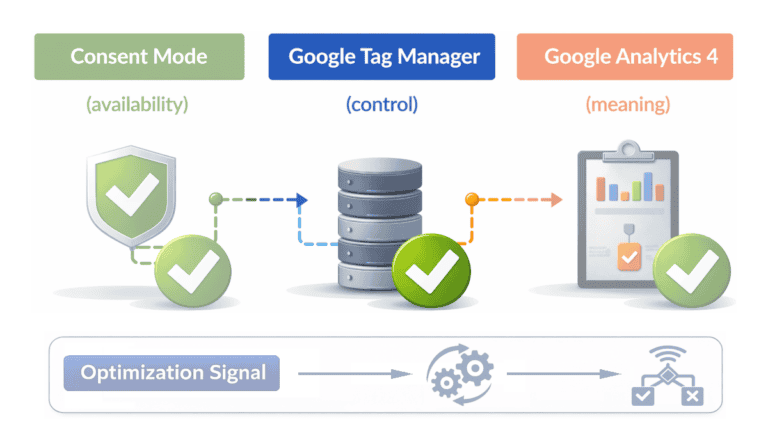
Consent Mode (availability) → Google Tag Manager (control) → Google Analytics 4 (meaning) = optimization signal

Consent Mode – Signal availability
How to ensure data legality and model missing information

Google Tag Manager – Signal control
Signal control How to manage the technical origin and quality of data

Google Analytics 4 – Signal meaning
Signal meaning How to turn raw data into conversions and decisions
Optimization Signal
When availability, control, and meaning come together, an optimization signal is formed
The optimization signal determines what algorithms learn, what kind of traffic they begin to favor, and where budget is allocated.